High-performance Rust rewrite of an internal feed-scraper I built at eSentire. Pulls payload domains, C2 IPs, phishing hosts, and other indicators from a set of public feeds, normalizes them, and emits clean reports ready for firewall or SIEM ingestion.
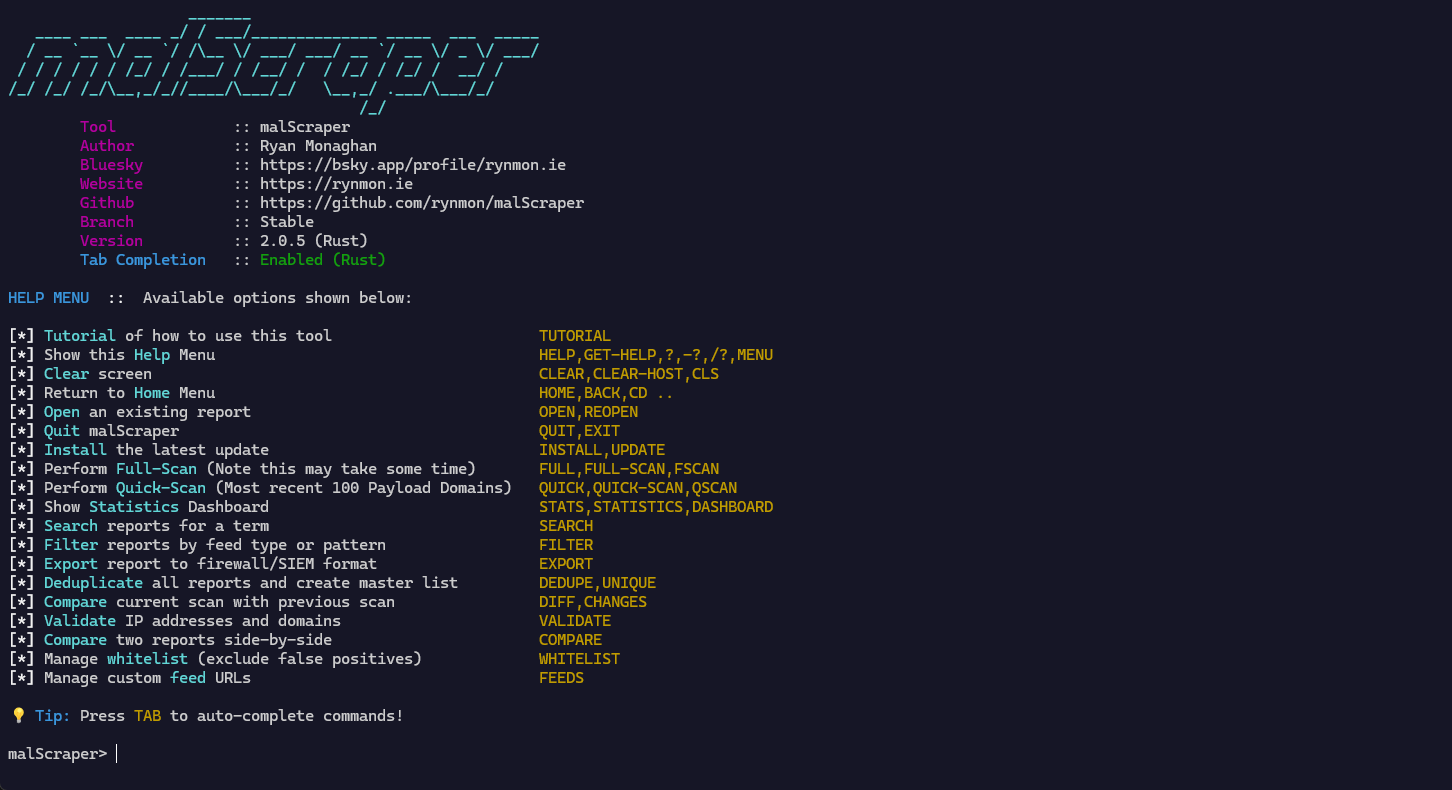
Quick start
Download pre-built binaries
Windows
- Download
malscraper-x86_64-pc-windows-msvc.exefrom releases - Rename to
malscraper.exeand run
macOS
- Download
malscraper-x86_64-apple-darwinormalscraper-aarch64-apple-darwinfrom releases - Make it executable:
chmod +x malscraper-* - Run:
./malscraper-*
Linux
- Download
malscraper-x86_64-unknown-linux-gnuormalscraper-aarch64-unknown-linux-gnufrom releases - Make it executable:
chmod +x malscraper-* - Run:
./malscraper-*
Build from source
Prerequisites
- Rust 1.70+
- Visual Studio Build Tools (Windows) or gcc/clang (Linux/macOS)
cd rust
cargo build --release
The binary will be at rust/target/release/malscraper (or .exe on Windows).
Features
Core
- High performance — 3–5× faster than the previous Python version.
- Single binary — no runtime dependencies.
- Cross-platform — Windows, macOS, Linux.
- Tab completion — built-in command completion.
- Async downloads — fast parallel downloads with progress bars.
- Memory safe — Rust's ownership model prevents common bugs.
- Auto-updates — built-in update checking via GitHub Releases.
New in v2
Analysis & intelligence
STATS— comprehensive metrics and analytics for all reports.SEARCH,FILTER— search across reports with regex support.COMPARE— side-by-side diff between two reports.DIFF,CHANGES— track changes over time and surface new indicators.
Data management
DEDUPE,UNIQUE— deduplicate across reports into a unified master list.VALIDATE— validate IP addresses and domains, check liveness.WHITELIST— exclude known-good indicators.
Export & integration
EXPORT— multiple formats:- Firewall rules:
iptables, Windows Firewall, pfSense. - SIEM formats: JSON, CSV with metadata.
- Threat intel: STIX/TAXII.
- Firewall rules:
Customization & automation
FEEDS— add, list, or remove custom feed URLs.- Non-interactive mode — CLI args for automation and scripting.
UPDATE,INSTALL— download and install updates with platform detection.
Usage
Run the tool:
malscraperPress TAB for command auto-completion.
Available commands
Basic operations
FULL/FULL-SCAN— complete scan of all feeds.QUICK/QUICK-SCAN— quick scan (most recent 100 domains).OPEN/REOPEN— open a previously downloaded report.UPDATE— check for and install updates.HELP— show help menu.TUTORIAL— show tutorial.QUIT/EXIT— exit the application.
Analysis
STATS— statistics dashboard.SEARCH <term>— search across reports.FILTER [feed_type] [pattern]— filter reports by criteria.COMPARE <report1> <report2>— compare two reports.DIFF/CHANGES— compare current scan with previous scan.
Data management
DEDUPE/UNIQUE— deduplicate all reports into a master list.VALIDATE <report>— validate IPs and domains.WHITELIST ADD <indicator> [reason]WHITELIST LISTWHITELIST REMOVE <indicator>
Export & integration
EXPORT <format> <report>— export to firewall/SIEM formats.- Formats:
iptables,windows,pfsense,json,csv,stix,taxii. - Reports:
payload,amp,c2,hex,haus,phish,top100.
- Formats:
Customization
FEEDS ADD <url> [name] [description]FEEDS LISTFEEDS REMOVE <name_or_url>
Non-interactive mode (CLI)
# quick scan with custom output directory
malscraper quick-scan --output-dir ./reports

# full scan
malscraper full-scan --output-dir ./reports

# export to iptables format
malscraper export iptables payload

# search across reports
malscraper search malware.com

# view statistics
malscraper stats

# see all available commands
malscraper --help
File locations
Reports are saved to:
- Windows —
%USERPROFILE%\Documents\malScraper\ - macOS / Linux —
~/Desktop/malScraper/
Antivirus warning
Some reports (especially PayloadReport.txt) may be flagged by antivirus software because they contain known malware indicators. These files are for research and defensive use only.
- You'll be prompted to obfuscate or zip the payload report on write.
- Consider adding an exclusion for the report directory.
Migration from Python/bash versions
If you were using the Python or bash versions:
- Download the Rust binary from releases.
- Existing reports are in the same location — no migration needed.
- Commands are identical — no learning curve.
- Performance improves — downloads and processing are faster.
Development
# clone the repository
git clone https://github.com/rynmon/malScraper.git
cd malScraper/rust

# build
cargo build --release

# run tests
cargo test

# format code
cargo fmt

# lint
cargo clippy
Performance comparison
| metric | python | rust | | --------------- | ------------------ | --------------- | | startup time | ~1–2s | <100ms | | download speed | baseline | 2–3× faster | | memory usage | ~50–100 MB | ~10–20 MB | | binary size | n/a | ~5–10 MB | | dependencies | python + packages | single binary |
Contributing
Contributions welcome. Feel free to:
- Open issues for bugs or feature requests.
- Submit pull requests.
- Improve documentation.
License
Licensed under the MIT license.